

How it works
Four steps from spreadsheet fund tracking to accurate fund balances inside QuickBooks Online — with you approving every entry before it posts.
Connect
Link your QuickBooks Online company in one click through Intuit. We import your chart of accounts and Classes; access can be revoked at any time.
Map
Each fund needs its own equity account in your chart of accounts. Point each one at the QuickBooks Class that tracks its activity, and pick the equity account where QuickBooks parks net income.
Preview
Each month we build the adjusting journal entry from your Profit & Loss by Class and show you every line — debits, credits, and totals — before anything touches your books.
Push
One click posts the balanced entry to QuickBooks as a journal entry you can open, audit, and reverse like any other — no spreadsheets, no manual math.
What the monthly entry actually does
QuickBooks Online doesn’t do fund accounting. At close, it sweeps all net income into a single equity account — the fund equalizer (often numbered 2910 or 3000) — so your restricted funds’ equity balances never move, no matter how much activity their Classes see.
AutoFund Accounting reads your chart of accounts, Classes, and Profit & Loss by Class report, and builds one adjusting journal entry per month: each fund’s class net income is moved out of the equalizer into that fund’s own equity account — a credit when the fund grew, a debit when it drew down — with the equalizer taking a single netted offsetting line. The General Fund residual simply stays in the equalizer.
The result: every restricted fund’s balance is accurate on your Balance Sheet, inside QuickBooks, every month. And because we only record the journal entries you approve, your books never change without your sign-off.
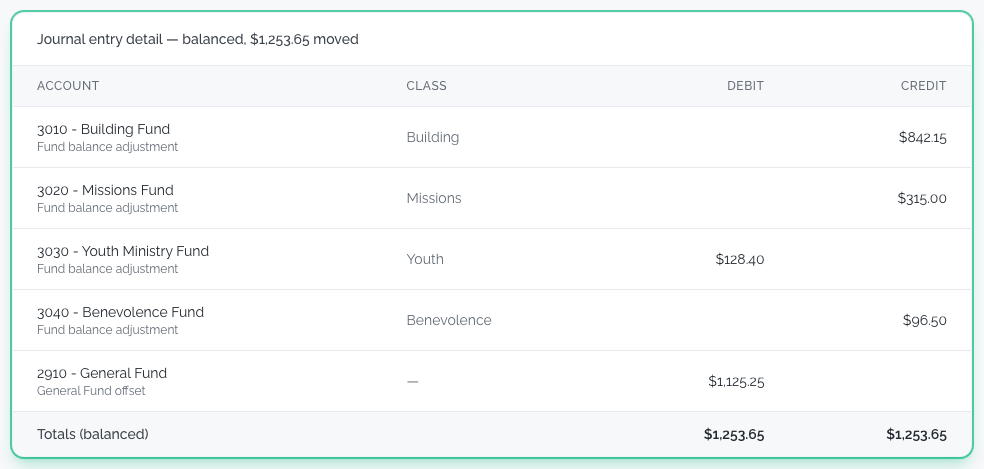
The monthly preview
Every line of the adjustment — per-fund debits and credits with the netted equalizer offset — before you approve it.
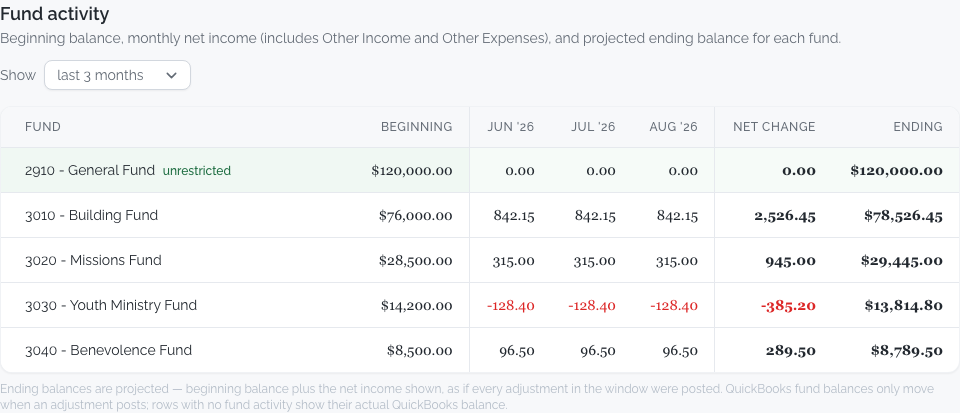
Live fund balances
Every mapped fund’s current balance, straight from your QuickBooks Balance Sheet.
Requirements: fund tracking uses QuickBooks Classes — this requires QuickBooks Online Plus or Advanced.
And each restricted or designated fund needs its own equity account in your chart of accounts — the account step 2 maps to. AutoFund maps to those accounts and can’t create them for you, so if your funds are tracked by class against a single net-assets account, add one account per fund first.